Cloudways free trial facts at a glance
The official free trial and any promotional balance are two different things. The trial gives temporary platform access; a credit can reduce eligible paid charges after an upgrade.
What is the Cloudways free trial?
The trial is temporary access to Cloudways’ managed cloud hosting platform. It lets you provision a working environment, deploy an application, review platform controls, and decide whether the service fits your website before paying.
It is not permanent free hosting, a money-back guarantee, or a promise that a promotional code will work for every new account. Cloudways uses pay-as-you-go billing after a Flexible account is upgraded.
The Flexible trial clock starts with server creation. Have your website copy, migration credentials, and test checklist ready before you click “Launch Now.”
Cloudways Flexible vs Autonomous
Both trials last three days, but they test different hosting models. Flexible is for users who want a server choice and broader PHP application support. Autonomous is for WordPress or WooCommerce users who prefer Cloudways to handle infrastructure and autoscaling.
| Feature | Flexible | Autonomous |
|---|---|---|
| Best for | Server choice and control | Managed WordPress autoscaling |
| Applications | WordPress and supported PHP apps | WordPress and WooCommerce |
| Infrastructure | You choose a cloud server | Cloudways manages the platform |
| Scaling | Restricted during trial | Automatic resource scaling |
| Key trial limit | One server; no server cloning | Limited trial resources |
| After trial | Manual upgrade to paid service | May auto-upgrade if a card was already attached |
Choose Flexible when
You want server-level choices, need a supported non-WordPress PHP application, or want to inspect a more hands-on hosting workflow.
Choose Autonomous when
You run WordPress or WooCommerce and want a managed application platform with automatic resource scaling.
What can you genuinely test?
Cloudways provides a working hosting environment, not just a product tour. A focused test can tell you whether the dashboard, deployment flow, migration process, controls, and short-term performance suit your workflow.
- Provision a server or application
- Install WordPress or WooCommerce
- Use a self-service migration workflow
- Review server and application credentials
- Inspect monitoring and logs
- Explore caching and PHP controls
- Test a staging or Cloudways URL where available
- Contact support with a specific question
- Review upgrade pricing
- Estimate add-on and backup costs
How to test performance fairly
Use the same website copy, page, theme, plugins, caching conditions, device, and testing region. Run at least three tests and compare the median result. A single best score is not reliable evidence of ongoing performance.
Important trial limitations
“Free trial” does not mean every paid capability is unrestricted. The most important limits affect how much you can compare during the short evaluation period.
One server, restricted scaling
Cloudways’ server-cloning guide says one server is permitted per account during the Flexible trial and cloning is blocked because it would create another server. Its scaling guide says trial accounts cannot upgrade configurations or launch larger servers directly.
Limited trial resources
Cloudways says an Autonomous trial application can stop if its trial resources are exhausted. Verify the live resource allowance and region choices shown in your dashboard before launch.
What three days cannot prove
A short trial cannot reliably prove long-term uptime, performance during seasonal traffic, support quality over several months, or the exact future bill for a workload that changes significantly. Treat it as a workflow and fit test.
How to start the Cloudways free trial
- 1
Create your account
Register with accurate information and complete any email, phone, or manual review Cloudways requests.
- 2
Select Flexible or Autonomous
Choose the product that matches what you need to test, then select the three-day free-trial option.
- 3
Configure the application
Pick the application, server or region options displayed, and review any visible paid pricing before launch.
- 4
Launch only when ready
Creating the Flexible server starts the timer. Begin when you can use the full three-day period.
- 5
Check the dashboard
Confirm the countdown, available features, resource limits, and any credit shown under Billing before making a purchase decision.
What the July 2026 account screenshot proves
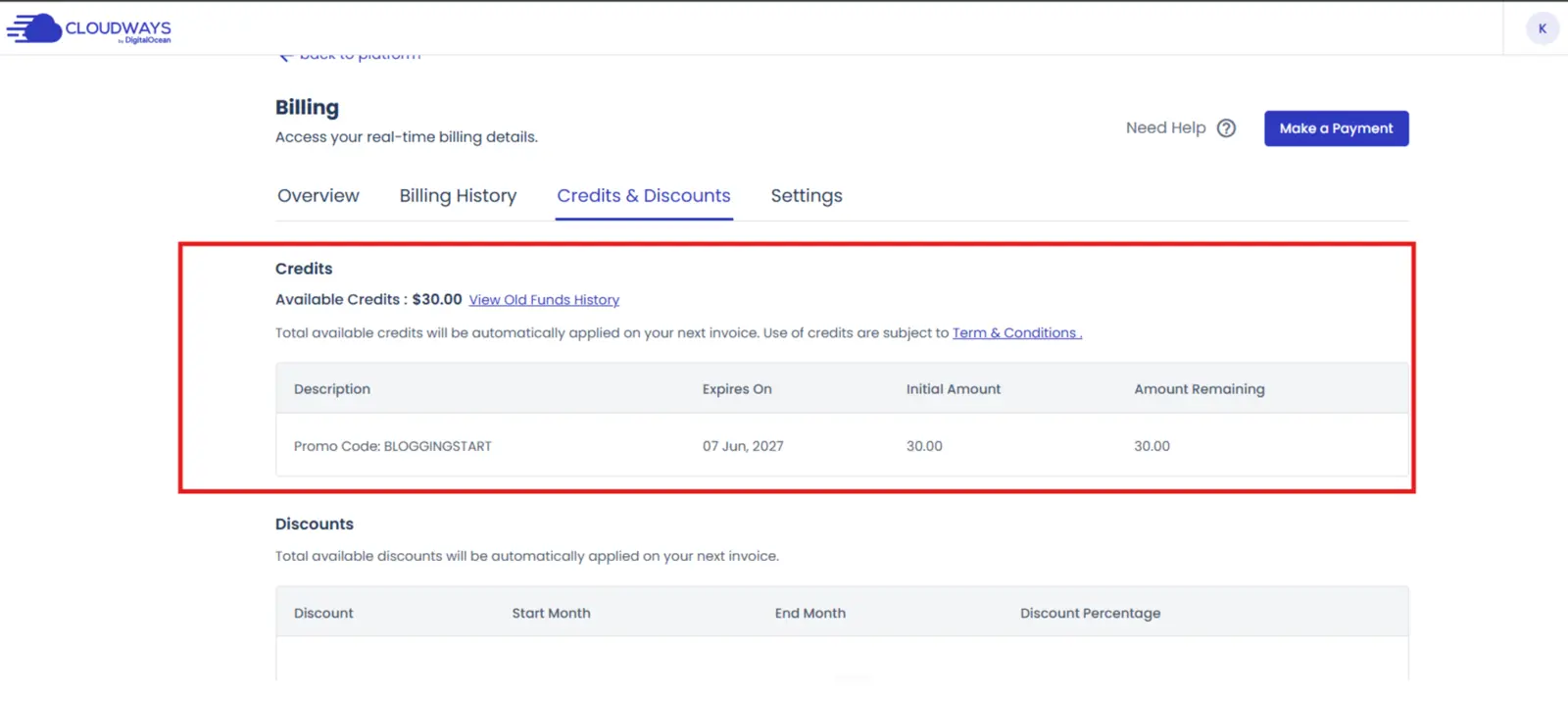
The screenshot below shows a $30 available credit associated with promo code BLOGGINGSTART inside one Cloudways Billing account. It proves that result for that account only. It does not prove universal eligibility or future availability.
Three-day Flexible and Autonomous trials
No card required to start
One Flexible trial server
Autonomous can auto-upgrade with a pre-attached card
A three-day dashboard countdown
Server and application access
$30 promotional credit after BLOGGINGSTART
An account-specific credit expiration date
A focused three-day test plan
Launch and configure
Record provisioning time. Inspect credentials, PHP settings, caching, monitoring, SSL options, and backup controls.
Migrate and test
Move a non-production copy. Check forms, login, checkout, images, plugins, internal links, and representative pages.
Support and cost
Ask a configuration-specific support question. Calculate hosting, backups, email, add-ons, bandwidth, and taxes.
Pricing, billing, and avoiding surprise charges
Cloudways Flexible currently advertises managed servers starting at $11 per month. Your actual cost depends on provider, server size, region, bandwidth, backup storage, and optional services. Cloudways bills usage hourly and summarizes it on a monthly invoice.
What happens when the trial ends?
Flexible requires an upgrade and valid billing details if you want to continue using the trial server. For Autonomous, an application can automatically upgrade if a payment method was attached before the trial began. If you do not want that, delete the application or unsubscribe before expiry.
Review whether a card is already attached, confirm the paid configuration, check Billing → Credits & Discounts, remove unwanted paid resources, and keep a backup before the trial expires.
Who should use it—and who should skip it?
Good fit
- WordPress and WooCommerce owners
- Developers managing supported PHP apps
- Agencies comparing managed cloud hosting
- Users moving beyond shared hosting
- People with a prepared test website
Probably skip
- Anyone needing permanent free hosting
- Users who require a long evaluation
- People who specifically want cPanel
- Buyers expecting bundled email hosting
- Anyone needing one fixed all-inclusive bill
Is the Cloudways free trial worth it?
Yes—if you prepare before launching. Three days is enough to assess the dashboard, application deployment, self-service migration, server controls, and initial fit without providing a card.
It is not long enough for casual exploration or to prove long-term reliability. Treat promotional credit as a separate account-specific bonus and verify it inside Billing before upgrading.
Check the current Cloudways trialCloudways free trial FAQ
How long is the Cloudways free trial?
Cloudways currently offers a three-day free trial for both Flexible and Autonomous. Check the live signup screen because trial terms can change.
Does Cloudways require a credit card for the free trial?
No. Cloudways says a card is not required to start either standard trial. Billing information is required when you upgrade to paid hosting.
When does the Flexible trial countdown begin?
The Flexible countdown starts when you create your first trial server, not when you initially register the account.
Can I migrate a website during the trial?
Yes. Cloudways offers self-service migration options during the trial. Keep the production website on its current host until the migrated copy has been checked.
Can I clone or scale a Flexible trial server?
Server cloning is blocked because only one Flexible trial server is allowed. Trial accounts also have scaling restrictions until they upgrade.
Will Cloudways charge me automatically?
A no-card Flexible trial cannot be billed without a payment method and upgrade. An Autonomous trial can automatically move to a paid plan if a payment method was attached before activation.
Can the Cloudways trial be extended?
Cloudways does not advertise a standard extension. Support may review an account-specific problem, but an extension is not guaranteed.
Is Cloudways free forever?
No. Cloudways provides a temporary evaluation period. Keeping the server or application after the trial requires paid service.
Is the $30 Cloudways credit guaranteed?
No. A $30 balance appeared in one July 2026 account after BLOGGINGSTART was applied. Credit eligibility, amount, and expiry can vary, so verify your own Billing area before upgrading.
Sources, verification, and corrections
This guide was fact-checked on July 26, 2026 using official Cloudways trial, billing, pricing, cloning, and scaling documentation. The promotional observation came from one account test and is not presented as a standard offer.
- Cloudways Flexible trial guide
- Cloudways Autonomous trial guide
- Cloudways Autonomous FAQ
- Cloudways getting-started FAQ
- Cloudways pricing
- Cloudways billing guide
- Cloudways server-cloning guide
- Cloudways scaling guide
Corrections policy: if a current Cloudways term changes or a sourced detail is incorrect, the page will be updated with the correction date and a brief explanation.
